Understanding LoRa Modulation through Comparison
Written by Alex, K2XAP of nyme.sh
LoRa packets come in a wide variety of shapes and sizes, depending on their parameters. These shapes bring with them pros and cons. One of the biggest impacts is the airtime. Meshes have to choose between range, noise tolerance, and time on the air, finding the right balance of link reliability and congestion for their density and location.
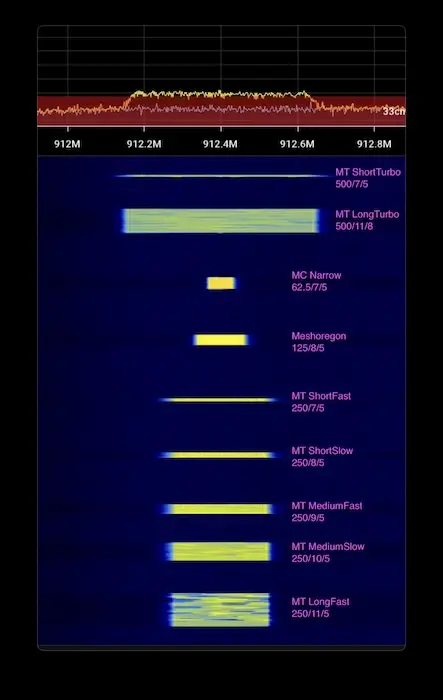
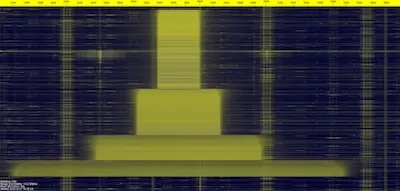
Real-time video (345kb) of the above waterfall. This graphic and the video are CC 0 or public domain — feel free to share and republish as useful.
Range, Airtime & Noise
At the default settings, a Meshtastic packet can take literally a whole second to transmit. This gives it great range and resilience, but a mesh can quickly become congested as soon as it exceeds the number of contacts a typical device can hold. Faster settings sacrifice range for much lower airtime, and can use infrastructure to compensate for lower link reliability with retries of packets. Each step faster in Meshtastic presets is a roughly 45% reduction in airtime.
The bandwidth also changes the exposure to noise. Wider bandwidth gives LoRa a much quicker transmission speed and reduces risk of "vertical" collisions in the temporal dimension, but it increases the chance of "horizontal" collisions in the spectral dimension — in addition to increased thermal noise exposure.
Every permutation of bandwidth, spread factor, and coding rate, from 62.5 kHz to 500 kHz.
The Three Modulation Parameters
Three settings define every LoRa preset. Together they decide how far a packet reaches, how long it stays on the air, and how well it survives noise.
- Spreading Factor
- How many chips encode each symbol (SF7–SF12). Higher spreading factor means more processing gain and longer range — but each step roughly doubles airtime.
- Bandwidth
- The width of the channel in kHz (62.5–500). Wider bandwidth transmits faster and resists temporal collisions, but exposes the signal to more noise and spectral collisions.
- Coding Rate
- Forward-error-correction overhead (4/5 through 4/8, written here as 5–8). More coding adds redundancy that recovers corrupted packets, at the cost of additional airtime.
Rule of thumb: longer range and better noise tolerance always cost airtime. A denser, busier mesh usually wants faster presets so more packets fit on the air.
Presets and Calculated Attributes
These are the presets and their calculated attributes based on the Semtech LoRa calculator:
| preset | bandwidth | spread_factor | coding_rate | effective_data_rate_bps | time_on_air_ms | link_budget_dB | range_km | processing_gain_dB |
|---|---|---|---|---|---|---|---|---|
| MC Narrow–Long | 62.5 | 9 | 5 | 879 | 248 | 154.0 | 4.89 | 27 |
| LongMod | 250 | 11 | 8 | 671 | 297 | 153.0 | 4.58 | 33 |
| LongFast | 250 | 11 | 5 | 1074 | 248 | 153.0 | 4.58 | 33 |
| MediumSlow | 250 | 10 | 5 | 1953 | 124 | 150.5 | 3.89 | 30 |
| MC Narrow | 62.5 | 7 | 5 | 2734 | 72 | 149.0 | 3.53 | 21 |
| Meshoregon | 125 | 8 | 5 | 3125 | 72 | 148.5 | 3.41 | 24 |
| MediumFast | 250 | 9 | 5 | 3516 | 62 | 148.0 | 3.30 | 27 |
| LongTurbo | 500 | 11 | 8 | 1343 | 148 | 148.0 | 3.30 | 33 |
| ShortSlow | 250 | 8 | 5 | 6250 | 36 | 145.5 | 2.80 | 24 |
| ShortFast | 250 | 7 | 5 | 10938 | 18 | 143.0 | 2.38 | 21 |
| ShortTurbo | 500 | 7 | 5 | 21875 | 9 | 138.0 | 1.72 | 21 |
Reading the table: presets at the top reach farther (higher link budget and range) but sit on the air far longer; presets at the bottom clear the air in milliseconds at the cost of range.
Reproduce the Waterfall
These steps will reproduce the demonstration above. This uses MeshCore because it can change radio settings without a device reboot, but the output is equivalent to any LoRa transmission.
- Tune an SDR to the desired frequency. The script defaults to 912.4 MHz.
- Flash a node as a USB MeshCore companion.
- Install the meshcore python library:
pip install meshcore. - Run the script (set the
INTERFACEto the connected device):
import asyncio
from meshcore import MeshCore, EventType

INTERFACE = "/dev/tty.usbmodem1301"  # Set this to your local device
FREQUENCY = 912.4 # MHz, Change this to the desired frequency
PRESETS = [
    (250,11,5),   # MT LongFast
    (250,10,5),   # MT MediumSlow
    (250,9,5),    # MT MediumFast
    (250,8,5),    # MT ShortSlow
    (250,7,5),    # MT ShortFast
    (125,8,5),    # MeshOregon
    (62,7,5),     # MC Narrow
    (62,9,5),     # MC Narrow Long
    (500,11,8),   # MT LongTurbo
    (500,7,5),    # MT ShortTurbo
]

async def main():
    meshcore = await MeshCore.create_serial(INTERFACE)
    await meshcore.commands.set_tx_power(1) # Be a good RF neighbor
    await asyncio.sleep(1)
    for (bw,sf,cr) in PRESETS:
        await meshcore.commands.set_radio(FREQUENCY, bw, sf, cr)
        print((bw, sf, cr))
        result = await meshcore.commands.send_chan_msg(0, "The quick brown fox jumped over the lazy dog")
        print(result)
        await asyncio.sleep(1)
    await meshcore.disconnect()

asyncio.run(main())